

General downloads
MBS-Navision 3.70 Application Server - White Paper
- Author
- Microsoft Business Solutions
- Category
- General downloads
- Date
- 01/09/2003
- Size
- 848,79 KB
- Downloads
-
5369
Detailed statistics
- Downloads today 0
- 30 day downloads 8
- Total downloads 5369
- Overall download rank #94 / 2084
- Today page views 0
- 30 days page views 1
- Total views 14987
- Rating

 Detailed statistics
- x 2 20,00%
- x 4 40,00%
- x 1 10,00%
- x 1 10,00%
- x 2 20,00%
- Popularity
- Downloaded 5 times in the last two weeks
This white paper gives a technical description of how to start up Microsoft Business Solutions–Navision Application Server (NAS) and the activities it performs in the e-business solutions.
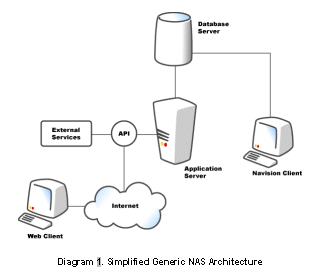
Navision Application Server is a middle-tier server that runs as a service. It is designed to provide access from external clients to the Navision database. Navision Application Server can do this because it runs key components of the business logic of Microsoft Business Solutions–Navision, so it is able to initiate processes to produce refined results in the same way as if one were requesting information from a Navision client.
The key role of the application server is in the e-business solutions. For example, Navision Application Server provides connectivity between a Web client (such as Navision Commerce Portal) and Navision Database Server; between an external application (such as Microsoft Business Solutions–Axapta) or a Navision client and the database; and between third-party devices (such as Automatic Data Capture System) and Navision. The application server can also serve the Navision client itself, with automated posting and printing.
The paper describes how the application server works together with Navision Commerce Portal and Navision Commerce Gateway. It also describes User Portal Application Server (UPAS) which is the application server used with Navision User Portal.